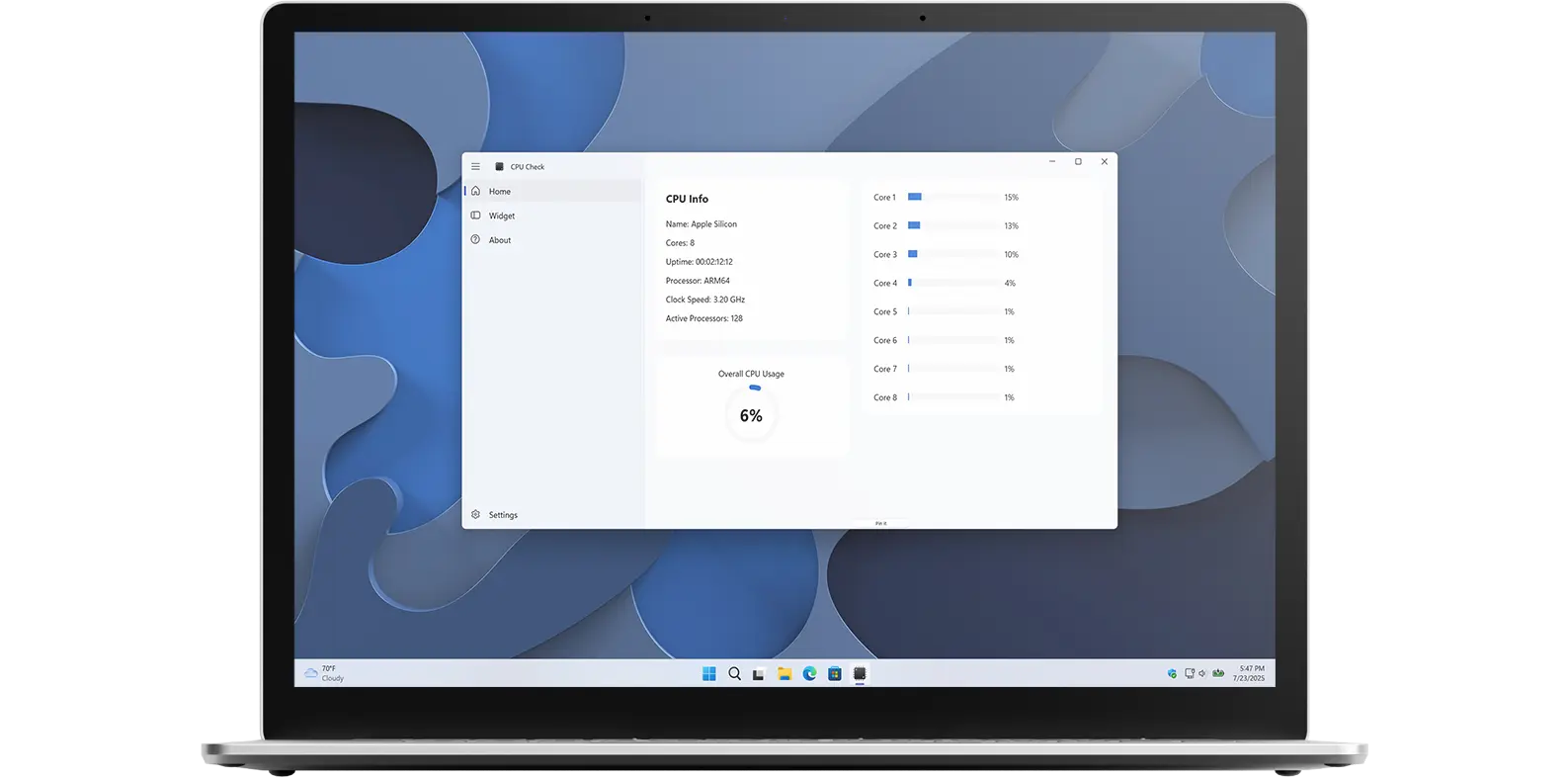
Monitor your CPU usage in real time with ease. CPU Check shows how much processing power is currently available on your computer. Available for both Windows and macOS.
Get real-time information about your Central processing unit (CPU).
That provides real-time monitoring of your Windows and Mac's performance, including CPU utilization. This supports the Multi-core processor from dual to quad-core by Intel, AMD and others. You will see for each unit the current percent value in the app and the notification widget. This makes CPU Check ideal for gamers, developers, power users, and heavy video editors who need to keep an eye on performance while working or playing.
As a developer who spends hours coding and testing applications, I constantly needed to monitor my CPU performance to ensure my systems were not overheating or bottlenecking. Existing tools were either too complex, required technical knowledge to interpret, or simply did not provide the at-a-glance information I needed while working.
I wanted something simple. Just the essential metrics displayed clearly, without overwhelming dashboards or confusing graphs. CPU Check was born from that need: a lightweight, straightforward app that shows you what is happening with your processor in real time, whether you are gaming, video editing, developing software, or just curious about your system's performance.
Most importantly, I wanted a desktop widget that stays visible at all times something the built-in operating system tools simply do not offer. With CPU Check, you can glance at your CPU usage, temperature, and speed without opening any application or switching windows.
My goal was to create a tool that anyone could use, regardless of technical expertise. Whether you are a power user who needs per core details or someone who just wants to know if their system is running smoothly, CPU Check gives you the information you need, when you need it.
| Feature | CPU Check | Task Manager |
|---|---|---|
| Real-time CPU monitoring | ✓ Yes | ✓ Yes |
| Temperature tracking | ✓ Yes | ✗ Limited |
| Clock speed display | ✓ Yes | ✗ No |
| Desktop widget | ✓ Yes | ✗ No |
| Cross-platform (Windows + Mac) | ✓ Yes | ✓ Yes |
| Apple Silicon support (M1-M5) | ✓ Full | ✓ Basic |
| Ease of use | Simple | Moderate |
| Price | $1.99 | Free |
CPU Check reads data directly from your computer's hardware sensors and system APIs to provide accurate, real-time performance metrics. On Windows, the app queries the Windows Management Instrumentation (WMI) and performance counters to gather CPU utilization, temperature readings from thermal sensors, and current clock speeds from the processor's power management system.
On macOS, CPU Check uses the IOKit framework and system_profiler commands to access similar information from Apple Silicon and Intel-based Macs. The app continuously polls these sensors at regular intervals, typically every second, to update the display with current values. This ensures you see live performance data without significant lag.
The desktop widget receives this data through a background service that runs with minimal system overhead, ensuring accurate monitoring without impacting your computer's performance. All data processing happens locally on your device—no information is sent to external servers, maintaining your privacy and security.
CPU Check is designed specifically for CPU monitoring and does not track other hardware components such as GPU, RAM, disk usage, or network activity. The app provides real-time current values but does not include historical data logging, performance graphs over time, or advanced diagnostic features for troubleshooting hardware issues.
Temperature readings depend on your computer's hardware sensors. Some systems may not expose all sensor data, particularly on certain laptop models or older hardware. CPU Check cannot monitor virtual machines or remote systems directly it only reads data from the local device where it is installed.
The app is a monitoring tool, not a system optimizer. It does not adjust CPU settings, overclock your processor, or modify system performance parameters. For advanced system tuning or diagnostics, you may need additional specialized software.
CPU Check supports a wide range of processors from single-core CPUs to Intel Core i3, i5, i7, and the latest i9 models with Turbo Boost Technology. The app is available for both Windows and macOS, with full compatibility for Apple Silicon chips, including the M1, M1 Pro, M1 Max, and M1 Ultra, all built on ARM architecture. Since late 2025, CPU Check also supports the newer M5 chips, including the M5 Pro and M5 Max, which offer up to a 15% improvement in CPU performance and core efficiency. Support now also includes the latest M2, M3, M4, and M5 chips, delivering even greater speed, power efficiency, and advanced architecture for next-generation macOS devices.
Have questions about the CPU Check app? Check out our FAQ section below for answers to common queries. If you need further assistance, feel free to contact our support team.
CPU Check is a real-time CPU monitoring application, designed to provide users with detailed insights into their computer's processor performance. Available for both Windows and macOS, the app offers intuitive visualizations and widgets to help users monitor CPU usage effectively.
CPU Check’s installation limits depend on the platform and licensing:
A Microsoft Store purchase can be installed on multiple Windows machines, up to 10 devices per Microsoft account.
App Store purchases are tied to your Apple ID. You can install the app on all Apple devices signed into that Apple ID, and you can also share purchases with your Family Sharing group.
Yes, CPU Check supports a wide range of processors, including Intel, AMD, and Apple Silicon CPUs. It works with Intel CPUs from older generations to the latest multi-core models. AMD processors, including Ryzen and EPYC series, are fully supported as well. For Apple devices, CPU Check is compatible with Apple Silicon chips such as M1, M2, and newer versions. The app can monitor CPU usage, core temperatures, and clock speeds across all these platforms, making it versatile for both Windows and macOS users.
Yes, CPU Check can monitor both CPU temperature and clock speed in real time. It provides detailed, per-core information, allowing users to track how their processor is performing under different workloads. This feature helps identify potential overheating issues, optimize performance, and ensure that your CPU is running efficiently.
CPU Check is designed to provide highly accurate real-time monitoring of CPU usage, temperature, and clock speeds. It reads directly from the system’s hardware sensors, giving reliable insights for both casual users and professionals who need consistent CPU performance data.