[Skip navigation links]
Stefan vd
Overview Hard Disk App

Check your disk space
at a glance

Hard Disk is a disk space monitor that shows used and free storage on all your connected drives, local and networked, at a glance. Available for Windows, macOS, iOS, iPadOS, watchOS, tvOS and visionOS.
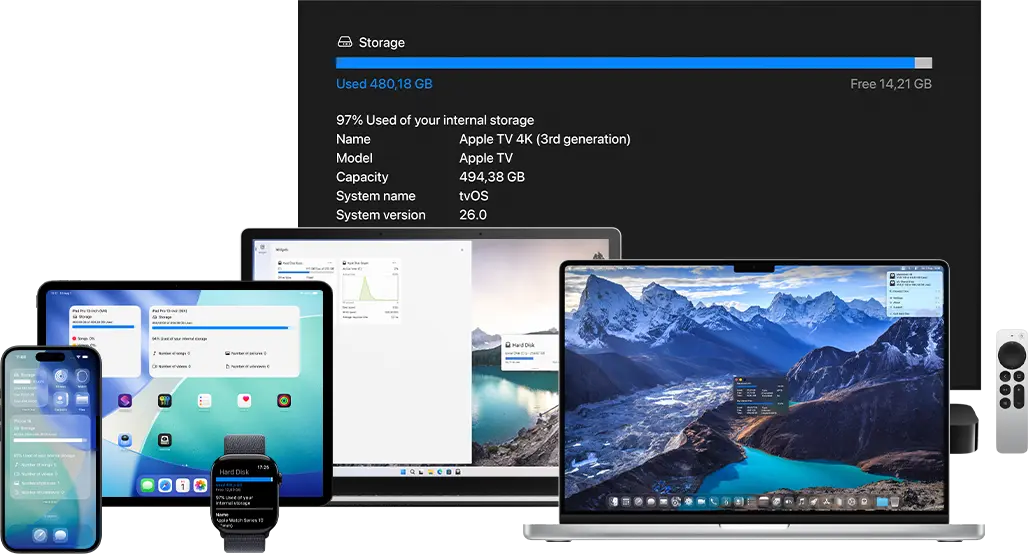
Hard Disk app on all devices

What does this app do?

Get a clear overview of all your connected local and network storage devices.

The Hard Disk app is the perfect utility for anyone who wants a quick, clear overview of their disk space. It provides a complete summary of your storage, including total capacity, available space, and detailed usage breakdowns. Easily see how much space is left, what is taking up the most room, and whether it is time to clear out unnecessary files.

Availability on all platforms

Each platform offers a unique experience for monitoring your storage in a dedicated way. With a variety of useful widgets, you can quickly check your storage at a glance, whether it is from the Windows Widget Dashboard, the Mac desktop, or the iOS home screen.

More system monitor apps

Want to keep an eye on the rest of your system? I also make GPU Check for graphics card usage, CPU Check for processor usage, and Memory Check for RAM usage.

Get Hard Disk app

Download the Hard Disk app today and take control of your storage. Instantly see how much free space you have across all your connected drives, and start managing your disk space like a pro, no matter what device or platform you use.

Get Hard Disk from the Microsoft Store Get Hard Disk from the Apple Mac App Store Get Hard Disk from the Google Play Store
Compatible with Windows 11, macOS 14 or later, iOS 26, iPadOS 26, watchOS 26, tvOS 26, visionOS 26, and Android 7.0 or later.

Frequently Asked Questions

Have questions about the Hard Disk app? Check out our FAQ section below for answers to common queries. If you need further assistance, feel free to contact our support team.

What is Hard Disk?

The Hard Disk app is a cross-platform utility designed to provide real-time monitoring of your device's storage across various operating systems, including Windows, macOS, iOS, iPadOS, watchOS, tvOS, and visionOS.

Can I install it on many devices?

Hard Disk’s installation limits depend on the platform and licensing:

A Microsoft Store purchase can be installed on multiple Windows machines, up to 10 devices per Microsoft account.

App Store purchases are tied to your Apple ID. You can install the app on all Apple devices signed into that Apple ID, and you can also share purchases with your Family Sharing group.

Can I monitor storage on my iOS home screen or lock screen?

Yes! With the Hard Disk app, you can monitor your storage directly from your iOS home screen or lock screen using its customizable widgets. These widgets display real-time information about your device’s storage, including total capacity, available space, and usage breakdown. You can choose from different sizes, styles, and light/dark mode options to match your device’s look and easily keep an eye on your storage without opening the app.

Does Hard Disk support external drives and network storage?

Yes! Hard Disk fully supports external drives (like USB drives and SD cards) as well as network storage (such as NAS drives). Once connected, the app automatically detects these drives and includes them in your storage overview, allowing you to monitor their total capacity, used space, and available space just like your internal drives.

Is my data safe? Does Hard Disk access files?

Yes! Hard Disk only reads storage information such as total capacity, used space, and free space. It does not access, view, or modify your personal files. Your data remains completely private and secure, and the app is designed purely to help you monitor disk usage, not interact with your files.