Table of Contents
Publishing a browser extension looks simple at first: upload your ZIP file, add screenshots, write a description, and click submit to publish it to the store. Beginner browser extension store mistakes are common at this stage. In reality, every web browser store has its own hidden rules, review checks, and strict requirements. Ignoring even a small detail can lead to rejection, delays, or certificate test failures.
In this developer article, I share real-world lessons learned from maintaining and publishing browser extensions across Google Chrome, Microsoft Edge, Firefox, Safari, Opera, and more. Such as my free and Open-Source Turn Off the Lights browser extension.
Browser Extension Store Mistakes
Here are the browser extension store guidelines every developer should know. They are common standards you should follow for all web browsers.
One Commence Guideline
Before writing code or marketing text, understand one important rule: each web browser store reviews your extension independently. There is no universal rulebook that works everywhere.
Some stores focus heavily on privacy, others on branding, and others on trademark protection. Treat every store as its own platform with unique expectations.
Text description
Your browser extension description is often the first reason extensions get rejected.
What to avoid:
- Do not mention competing browsers by name in the description (for example: Google Chrome, Firefox, Opera, Microsoft Edge).
- Avoid over-promising features that are not clearly available or visible in the browser extension.
- Do not state that any part of the extension is in beta. Only stable browser extensions are accepted in stores.
- Do not use product and trademarked names in your description without permission from the official developer or company.
What to do:
- Keep the description general and platform-neutral
- Focus on features, not competitors
- Use clear, honest language
Browser name
Apple Safari and Microsoft Edge are very strict about competitor mentions. For example, this text will fail review on the Microsoft Edge Add-ons gallery:
This extension is available also for Google Chrome, Opera, and Safari web browser.
They will fail the certificate test. Instead, use a neutral approach:
This browser extension is available for all modern web browser visit this link: www.turnoffthelights.com/browser
This avoids trademark conflicts and keeps store reviewers happy.
Keywords
Keywords help discoverability, but they can also cause rejection if misused.
Best practices:
- Do not mention other browser extension names
- Do not use brand or trademarked keywords without rights
- Use feature-based keywords instead
Good keyword examples:
- dark mode
- productivity
- accessibility
- video enhancement
- privacy-friendly
Bad keyword examples:
- “YouTube Options extension”
- “Chrome official tool”
- competitor extension names
Images
Screenshots are not decorative, they are part of the review process.
Store requirements:
- Screenshots must match the actual browser User Interface
- No mockups or edited web browser frames
- No screenshots from a different web browser
For example:
- Safari screenshots → macOS
- Microsoft Edge screenshots → Windows
- Firefox screenshots → Windows
Fake or mismatched screenshots are a fast way to get rejected.
Operating System
According to StatCounter (December 2025), global desktop OS usage is:
- Windows 66.4%
- macOS 4.75%
- Linux 3.86%
- ChromeOS 1.24%
Source: OS market Share from StatCounter
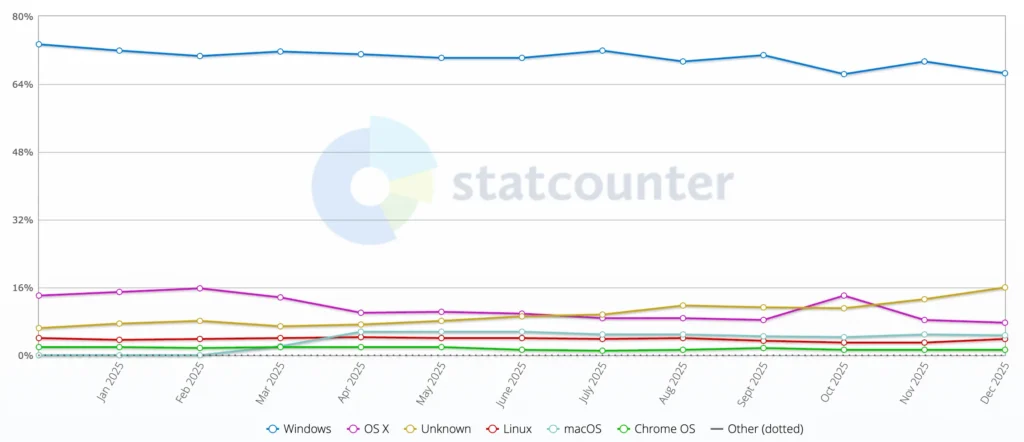
Because most users are on Windows, it is usually best to show screenshots taken on Windows for browsers such as Google Chrome, Firefox, Opera, and Microsoft Edge. For Apple platforms, you must use macOS screenshots. Do not use Chrome screenshots on the Apple App Store for your browser extension.
User Interface details matter. Window buttons, system fonts, and taskbars differ between operating systems, and reviewers notice.
Code
One of the other browser extension store mistakes developers make is lack of transparency. If your browser extension uses Open-Source libraries or third-party code, transparency is critical.
Some stores (especially Firefox Add-ons) require:
- Exact GitHub release links
- Clear license references
- No bundled “unknown” source files
Example:
In the Turn Off the Lights browser extension, I use Chart.js to display graphs showing how often a web page is dimmed and on which days the screen is dimmed the most.
For Firefox review:
- I link directly to the specific Chart.js GitHub release
- I use the UMD version, not a modified build
- I mention it clearly in the submission notes
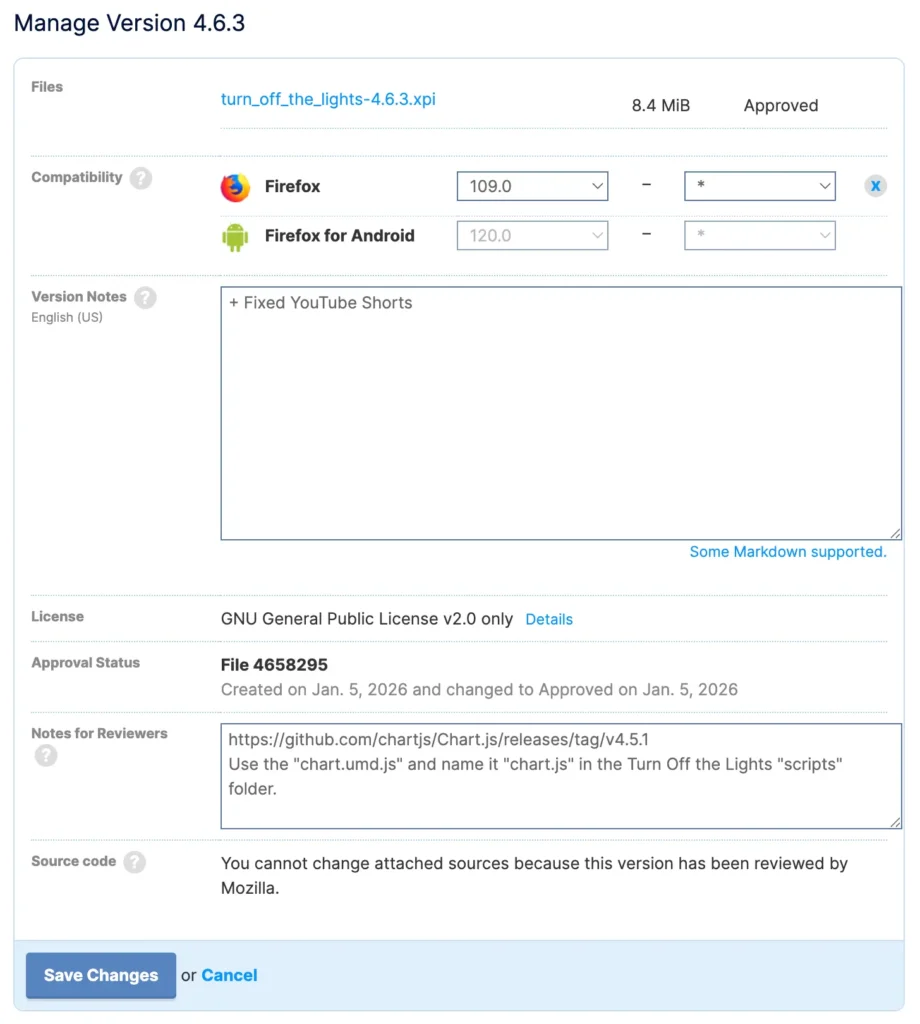
This saves time and avoids back-and-forth with reviewers.
Store Gallery
Besides your own browser extension store mistakes. Each store where you publish your browser extension has its own way of showcasing new extensions, with its own style and layout. Some browser extension stores do not have a mobile version of their website.
Many developers forget this: even if an extension store supports mobile viewing, it does not offer a dark mode version of the store.
| Store | Support browser | Dark Mode | Mobile |
| Chrome Web Store | Google Chrome/Chromium | ✅ (test seen 16 November 2025) | ❌ |
| Edge add-ons gallery | Microsoft Edge | ❌ | ✅ |
| Firefox add-ons gallery | Firefox | ❌ | ✅ |
| Opera | Opera | ❌ | ❌ |
| Naver Whale | Naver Whale | ❌ | ❌ |
| Apple App Store | Safari | ❌ | ✅ |
For some reason, I saw there was a test version of the Chrome Web Store supporting dark mode theme on 16 November 2025. But it is not always visible on the Chrome Web Store.
As on 31 March 2026, the Chrome Web Store supports Dark Mode.
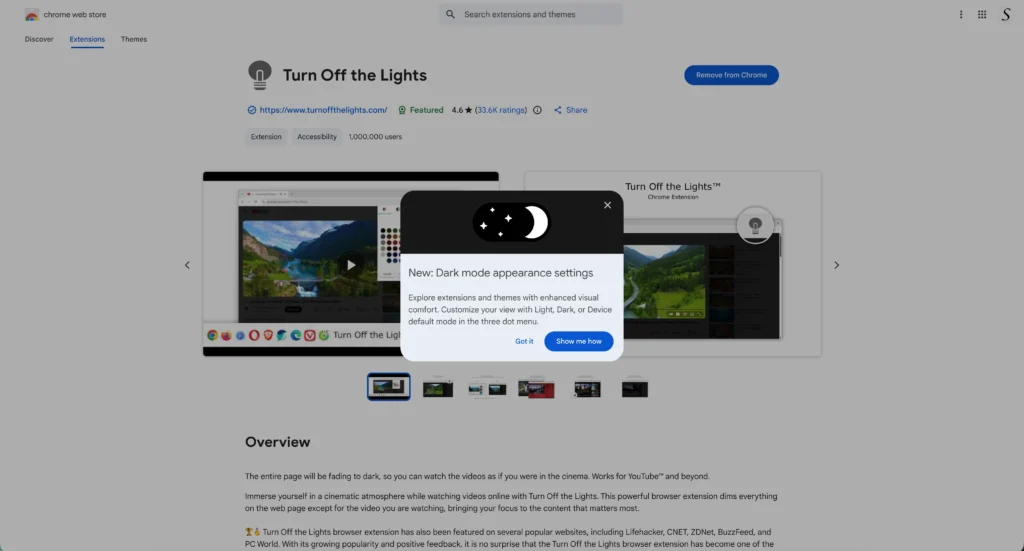
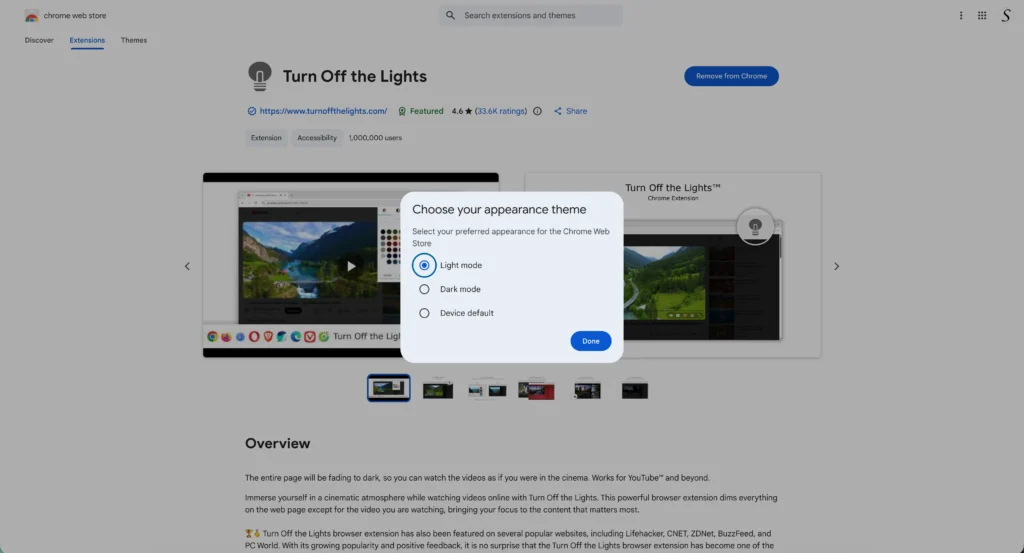
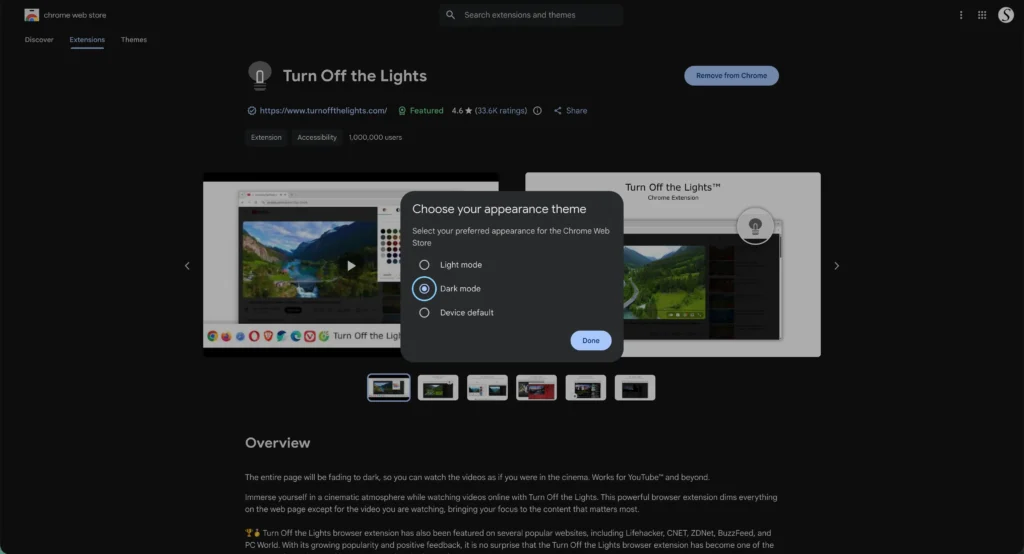
So the stores of these vendors still have a lot of work to do to bring harmony to a common standard and provide a great experience for both dark mode users and mobile users.
Resources
- Chrome Web Store Best Practices and Guidelines
- Apple App Review Guidelines
- Developer policies for the Microsoft Edge Add-ons store
- Firefox Add-on Policies
- Opera Extension Guidelines
Conclusion
There is still a long way to go before all browsers follow one unified standard. Each web browser has its own limitations, privacy rules, and review culture. Some platforms are more flexible, while others are far more strict. Understanding common browser extension store mistakes helps developers avoid unnecessary rejections and delays.
By following store guidelines, writing clear descriptions, using accurate screenshots, and respecting Open-Source licenses, you dramatically increase your chances of fast approval. Supporting multiple platforms is not just about compatibility, it is about delivering a better experience everywhere your users browse.
If you found this guide about browser extension store mistakes useful and would like to support continued work on browser extensions and developer education, consider supporting my work. Every donation, big or small, makes a huge difference. Thank you for helping me continue this important work.
