[Skip navigation links]
Stefan vd
Overview My Recent Documents App

Access your recent documents
with a single click

Introducing the My Recent Documents app. This application allows you to access your recently opened documents quickly, without the need to navigate through multiple folders or menus. That is available for Windows and macOS.

My Recent Documents app on all devices

What does this app do?

Access your recently opened documents quickly and easily.

My Recent Documents is a must-have application and widget for anyone looking to simplify computer use and boost productivity. It allows you to quickly access your recently opened documents without navigating through multiple folders or menus. High school and university students can easily continue working on files where they left off, whether that was yesterday or even last month.

Open the Office application

Besides the list of your recently opened documents, you can also open Microsoft Office applications directly from the app and widget. This includes direct access to Microsoft Word, Microsoft Excel, Microsoft PowerPoint, Microsoft OneNote, Microsoft Outlook, and Microsoft Teams.
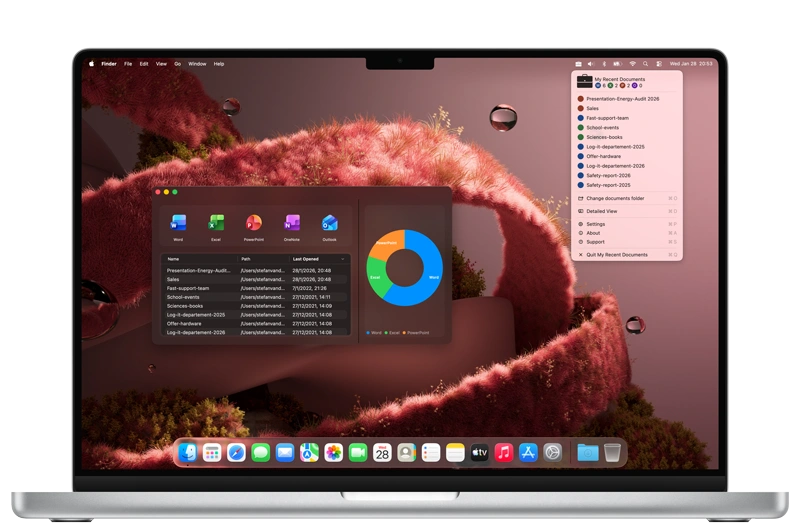

There is more to see

The user interface is clean and straightforward, allowing you to easily show more recently opened documents in a list. And a pie chart to understand what different document types are in your folder.

Get My Recent Documents app

Download the My Recent Documents app today and boost your productivity. Easily access your favorite app and website shortcuts through the app and the widget board. Get it now and discover how much time and effort you can save.

Get My Recent Documents from the Apple Mac App Store
Compatible with macOS 15.

Frequently Asked Questions

Have questions about the My Recent Documents app? Check out our FAQ section below for answers to common queries. If you need further assistance, feel free to contact our support team.

What is My Recent Documents?

My Recent Documents is a productivity-focused application and widget. It is designed to help macOS users quickly access their most recently opened documents, streamlining workflows and enhancing efficiency.

Can I install it on many devices?

My Recent Documents’ installation limits depend on the platform and licensing:

A Mac App Store purchase can be installed on multiple macOS machines, up to 10 devices per Apple account.

Can I add widget of my recent documents?

Yes! My Recent Documents allows you to show the list of your most recently opened documents in a widget on your macOS desktop and notification center.

Can I customize the appearance of My Recent Documents widget?

Yes! My Recent Documents allows you to customize the appearance of the widget. You can choose from different themes and adjust the size and position of the widget on your desktop.

Can I choose the folder location of my recent documents?

Yes! My Recent Documents allows you to choose which folders to monitor for recent documents. You can customize the list of folders that are tracked and displayed in the widget.